Processing calls
Processing a call happens in two steps: transcribing it, then having the AI analyse it, which writes its summary and answers your questions. You can do both at once, or transcribe first and analyse later, when you choose. Bringing a call in costs nothing: WhatCameUp only reads how long it is. You decide, for each collection, what happens to its calls as they arrive.
When new calls arrive
In a collection's Settings → General, When new calls arrive offers three choices:
- Wait until you choose: new calls wait in the collection's Calls as Not processed, and nothing is spent until you process them.
- Transcribe them: every new call is transcribed as soon as it comes in. You analyse the ones you want later.
- Transcribe and analyse them: every new call is transcribed and analysed as soon as it comes in. This suits a bucket or the API, where calls keep arriving and you want every one.
Processing when you choose
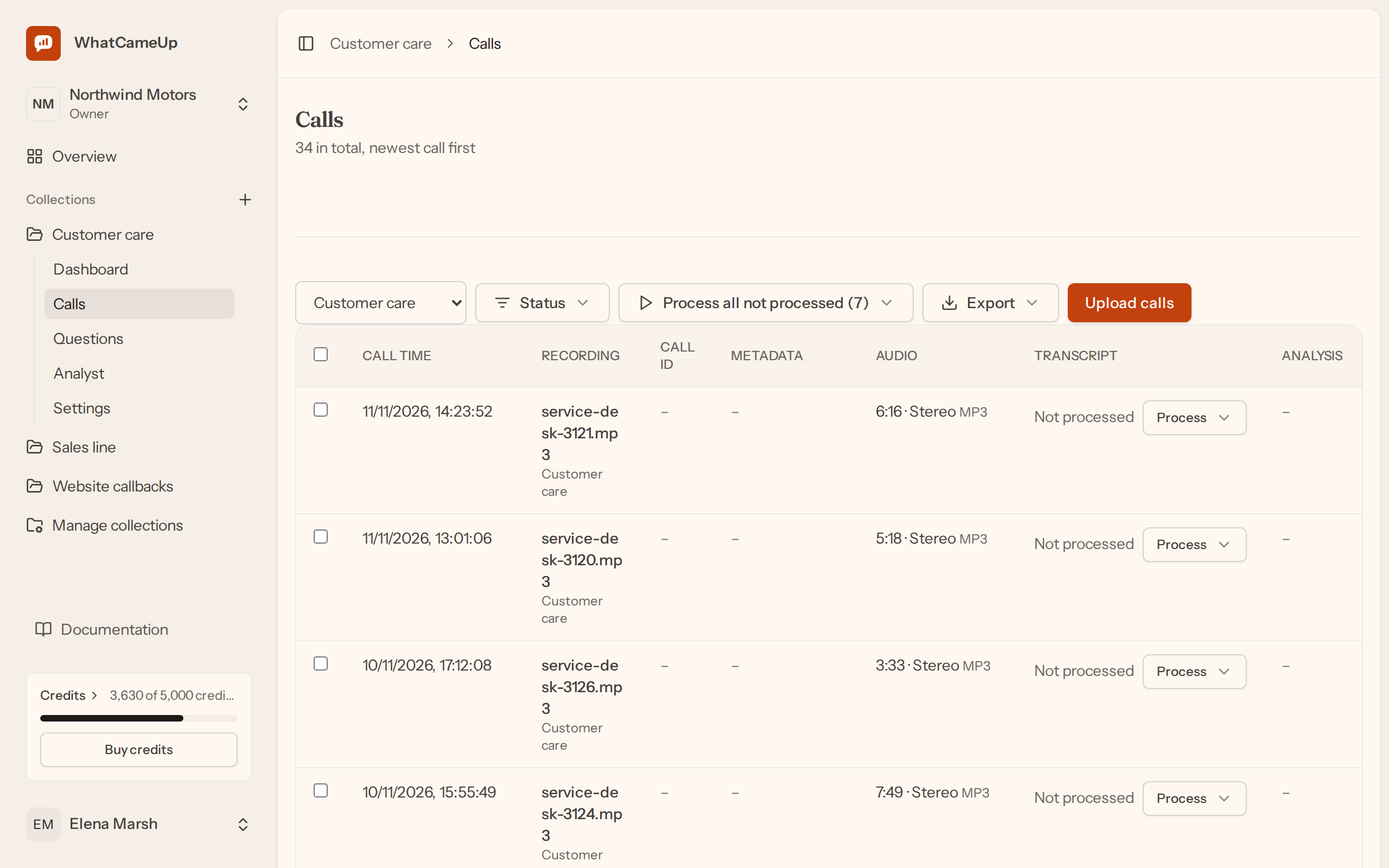
In a collection's Calls, you can:
- choose Process for a call not processed yet, then Transcribe and analyse or Transcribe only, each showing what it will cost;
- choose Analyse for a call that is transcribed but not analysed;
- tick some calls and choose Transcribe and analyse, Transcribe only or Analyse for all of them at once;
- narrow the list, for example to one collection and a week, and choose Process all not processed, then Transcribe and analyse or Transcribe only, for every call in the list, on every page;
- choose Analyse all not analysed to analyse every call in the list that is transcribed but not analysed.
Before anything starts, you see how many calls it covers and about how many credits it will take. Overview, Manage collections and each collection's dashboard show the calls still waiting with the same estimate. The Status menu above the calls lists only those Not processed or Not analysed, Too short to transcribe, or with Unreadable audio, and shows how many calls each covers.
A call's own page offers the same: Transcribe and analyse or Transcribe only while it is not processed, and Analyse once it is transcribed.
Your own systems can ask for calls to be processed too, in the steps they choose, through the API. See The API.
Analysing again
An analysed call's page offers Analyse again, for example after you changed the collection's questions or its instructions for the AI. The call keeps its analysis until the new one is ready, and keeps it if the new one fails. Analysing again costs what analysing does. The list offers Analyse these again for the calls analysed without all their customer's earlier calls (see Collections).
What it costs
A credit is a minute of call audio, counted to the second. Transcribing a call costs 0.8 credit a minute, and analysing it 0.2, so a call transcribed and analysed costs a credit a minute, the answers to its collection's questions included.
- Calls shorter than the collection's Skip calls shorter than setting are marked Too short as soon as they arrive, and cost nothing.
- Calls sent through the API as transcripts aren't transcribed, so they cost only their analysis, 0.2 credit a minute of the call. The Skip calls shorter than setting doesn't apply to them.
- Calls nobody answered are not analysed, and their transcription is not charged.
- If the team runs out of credits, calls wait as Waiting for credits, to be transcribed or analysed, and carry on by themselves once credits are added.
See Team, credits and privacy for credits and plans.
What processing finds
Transcribing finds:
- The transcript, line by line, with who spoke: Agent or Customer for stereo recordings, numbered speakers for mono ones. The phone system's welcome message and any hold time before the call is answered are folded away. On a mono recording, the call is taken as answered at the first line another voice answers within a few seconds, the first voice then answering back just as soon; what was said before it is folded away when a third voice, such as a recorded message, was heard there.
- Not answered: a call where nobody spoke to the customer, such as one that rang out or ended in the welcome message, is marked as such and not analysed.
- Timings: how long the customer waited before the call was answered, and how long they talked, added to the call's metadata. A mono recording with no welcome message or hold before its conversation may start at the answer, so it gives only how long they talked, from the first words, and one in which no two voices spoke to each other gives none.
A call sent through the API as its transcript arrives transcribed, with its lines as your system sent them, none folded away. Its lines give how long it lasted and how long each side spoke, but not how long the customer waited, unless its metadata says so as wait_seconds.
Analysing finds:
- The analysis: a summary, the reason for the call, and the customer's sentiment.
- Your questions, each answered from the transcript and the call's details, with the line or the detail that shows the answer. See Questions.
Dashboards count only analysed calls in their sentiment and answers, and show how many transcribed calls are not analysed yet.
When something goes wrong
- Unreadable audio: a file that isn't audio, is damaged or empty, or is no longer where it was, is marked Unreadable, with the reason under it. Reading it again would fail the same way, so only a call whose reason may pass, such as reading it taking too long, can be tried again: choose Try again on the call, Retry in the list, or Retry unreadable above the calls to try all of those again. Choose Unreadable in the Status menu to list every call whose audio couldn't be read.
- Transcription failed: choose Retry for the call in the list.
- Analysis failed: choose Try again on the call, or Retry in the list.
You are only charged for work that finished.