The API
The API lets your own systems send recordings or transcripts and call metadata to a collection, and read its calls back with their analyses and answers.
Tokens
API tokens belong to a collection, and work only with that collection's calls. Team owners and admins create them in the collection's settings: under Bringing calls in for an API collection, and under Metadata for an uploads or bucket collection. A token is shown once, when it is created; copy it then.
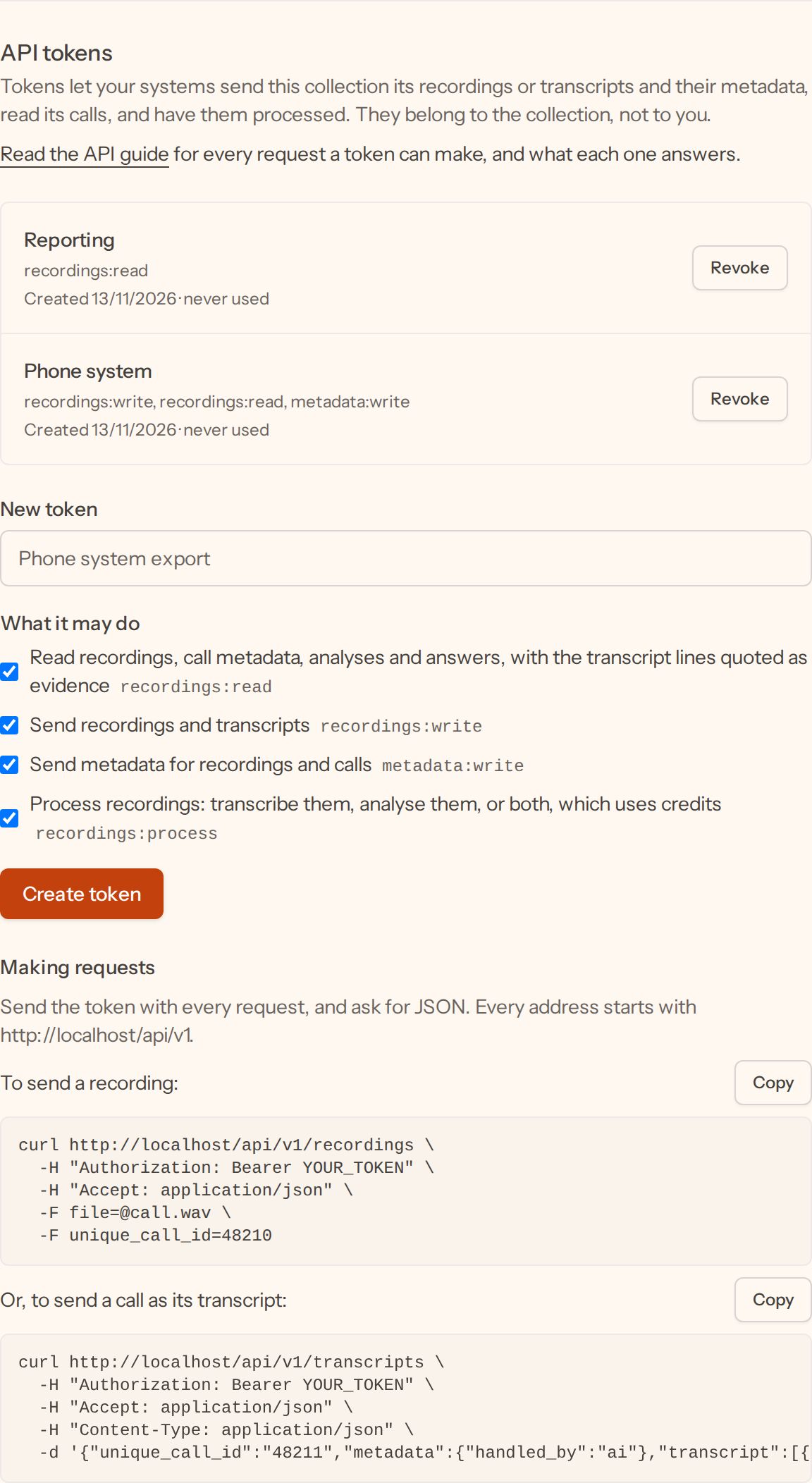
Each token may do only what you allow:
- recordings:read: read the collection's calls, with their metadata, analyses and answers, and the transcript lines quoted as evidence.
- recordings:write: send recordings and transcripts. Only for collections whose calls come in through the API.
- metadata:write: send metadata for recordings and call IDs. Only for collections set to Take metadata sent through the API.
- recordings:process: process the collection's calls, which uses credits. See Processing calls, below.
Send the token with every request, and ask for JSON:
Authorization: Bearer YOUR_TOKEN
Accept: application/json
Each token may make 120 requests a minute. Every address below starts with https://whatcameup.com/api/v1.
Sending a recording
For recordings up to 50 MB, send the file in one request, as a form upload:
POST /recordings
Content-Type: multipart/form-data
file: the recording, as AAC, AMR, FLAC, GSM, M4A, MP3, MP4, OGA, OGG, OPUS, WAV, WEBM, WMA.unique_call_id, optional: your own ID for the call.recorded_at, optional: when the call took place, with its time zone, like2026-10-07T09:01:23+03:00.metadata[agent]and so on, optional: any metadata fields.
It answers 201 Created with the new call. If the collection transcribes, or transcribes and analyses, new calls as they arrive, that starts straight away.
Larger recordings, up to 500 MB, go straight to storage in three steps:
POST /uploadswithfile_name,size_bytesandcontent_type, and anyunique_call_id,recorded_atandmetadata. The answer gives the upload'sid, and theurl,methodandheadersto send the file with.- Send the file to that
url, with that method and those headers. The address works for 60 minutes. POST /uploads/{id}/completion. It answers with the new call.
Sending a transcript
If your phone system or AI voice agent already transcribes its calls, send the transcript instead of the recording:
POST /transcripts
Content-Type: application/json

{
  "unique_call_id": "48211",
  "recorded_at": "2026-11-05T09:30:00+02:00",
  "metadata": {"handled_by": "ai"},
  "transcript": [
    {"speaker": "agent", "start_ms": 0, "end_ms": 3200, "text": "Hello, how can I help?"},
    {"speaker": "customer", "start_ms": 3600, "end_ms": 7000, "text": "I would like to change my booking."}
  ]
}
transcript: the call's lines, up to 5,000. Each has itsspeaker,agentorcustomer, when it starts and ends in milliseconds from the start of the call, and itstext, up to 10,000 characters. An AI agent speaks as theagent.unique_call_id,recorded_atandmetadata, optional: as for a recording.name, optional: what the call is called in the list of calls. Without one, it is named after its call ID, or the time it arrived.duration_seconds, optional: how long the call lasted, if longer than its last line. Calls last at most 6 hours.
It answers 201 Created with the new call, whose audio.status is none. Nothing is transcribed, so the call costs only its analysis, 0.2 credit a minute of the call. If the collection analyses new calls as they arrive, that starts straight away; otherwise ask for its analysis as below. A call in which the customer never spoke is marked not_answered, and isn't analysed.
The lines show how long the call lasted and how long each side spoke, but not how long the customer waited before an answer: send that as wait_seconds in the metadata, if your system knows it. To compare your AI agent's calls with your people's on the same questions, send them to the same collection with a field that tells them apart, such as handled_by.
Sending metadata
Metadata is a flat object of fields with plain values: text, numbers, true or false. Field names are lowercase letters, digits and underscores, starting with a letter, up to 32 characters, and a request can send up to 50 fields.
PATCH /recordings/{id}/metadataadds or changes fields on one recording; a field sent asnullis removed.PUTreplaces all the metadata sent for it.PATCH /calls/{call_id}/metadatadoes the same for a call ID, and applies to every recording of the collection with that call ID, including ones that arrive later.PUTreplaces it.
PATCH /calls/48210/metadata
Content-Type: application/json

{"metadata": {"agent_id": "17", "queue": "sales"}, "recorded_at": "2026-10-07T09:01:23+03:00"}
When a field comes from more than one place, the more specific wins: the file name, then the bucket's metadata file, then the call ID's metadata, then the recording's own.
Processing calls
A collection that doesn't process calls as they arrive waits for someone to ask. With a token allowed to process, your systems can ask too, in the steps they choose. Send steps as:
transcription_and_analysis, the default: transcribe the call, then analyse it;transcription: only transcribe it, to analyse it later;analysis: analyse a call already transcribed. This is the only step for a call sent as its transcript.
Transcribing costs 0.8 credit a minute and analysing 0.2; see Processing calls.
POST /recordings/{id}/processingprocesses one call. It answers202 Acceptedwith the call'sstatus,queued, and thecreditsit will use. A call that can't be processed, as one transcribed already, one not transcribed yet when you ask foranalysis, or one whose audio couldn't be read, answers409saying why.POST /recordings/processingprocesses several:{"recordings": [12, 13, 14]}, up to 500 at a time, or{"all": true}for every call of the collection the steps can start on. It answers how many werequeued, how many arewaiting_for_audio, how many wereskippedas they can't be processed, and thecreditsthe queued ones will use.
A call analysed already answers 409 when asked for analysis, so a request sent twice, as after a timeout, is not charged twice. To analyse it again, for one call, send {"steps": "analysis", "again": true}; again goes with analysis only. Each such request that is accepted is charged, so don't retry one that was. The call keeps its analysis until the new one is ready, and keeps it if the new one fails; meanwhile analysis.again shows the new one's status, and its error if it failed.
You can ask straight after sending a recording. Its audio is still being read then, so it answers waiting_for_audio: the call is processed as soon as its audio is read, and shows when processing was asked for as transcription.requested_at.
A call waiting for the team to have credits shows waiting_for_credits as its transcription.status or analysis.status, or, when it is to be analysed again, as analysis.again.status. It carries on by itself once credits are added.
Reading calls
GET /recordingslists the collection's calls, newest first, 50 to a page: ask for the next with?page=2, and readmetaandlinksfor how many there are. Add?unique_call_id=48210to find the recordings of one call.GET /recordings/{id}gives one call.GET /calls/{call_id}gives what is known about a call ID: its recordings and the metadata sent for it.
Every answer is wrapped in data. A call comes with its file, its collection, its call ID and time, its metadata and where each field came from, its audio and transcript status, its analysis (summary, reason, sentiment) and its answers to the questions its collection still asks. Each answer has the question, the answer, and what shows it:
evidence: the line of the transcript, withstart_ms,speakerandtext, ornull.evidence_detail: the call detail it came from, with itsnameand itsvalueas text, ornull. The name is a metadata field, orcall_started_atorcall_length_secondsfor when the call took place and how long it lasted.
In a collection that tells its customers apart, called_again says whether the same customer called again within 7 days after the call: value is true or false, and final says whether that is settled. A false can still become true until final_on, 7 days after the call. It is null for a call that isn't counted: one with no known customer, a duplicate, one on a number shared by too many calls, or one whose content was removed before its 7 days had passed. These are the calls the repeat-call figure counts.
Errors
Errors answer with a status code and a JSON message, and, for invalid requests (422), the errors for each field. A request the token may not make answers 403, a call of another collection 404, and too many requests 429.