Collections
A collection holds the calls that come in one way, along with every setting about reading them and the questions they are asked. Most teams have a collection for each kind of call they take, such as sales and customer care, so each can be asked its own questions and have its own dashboard.
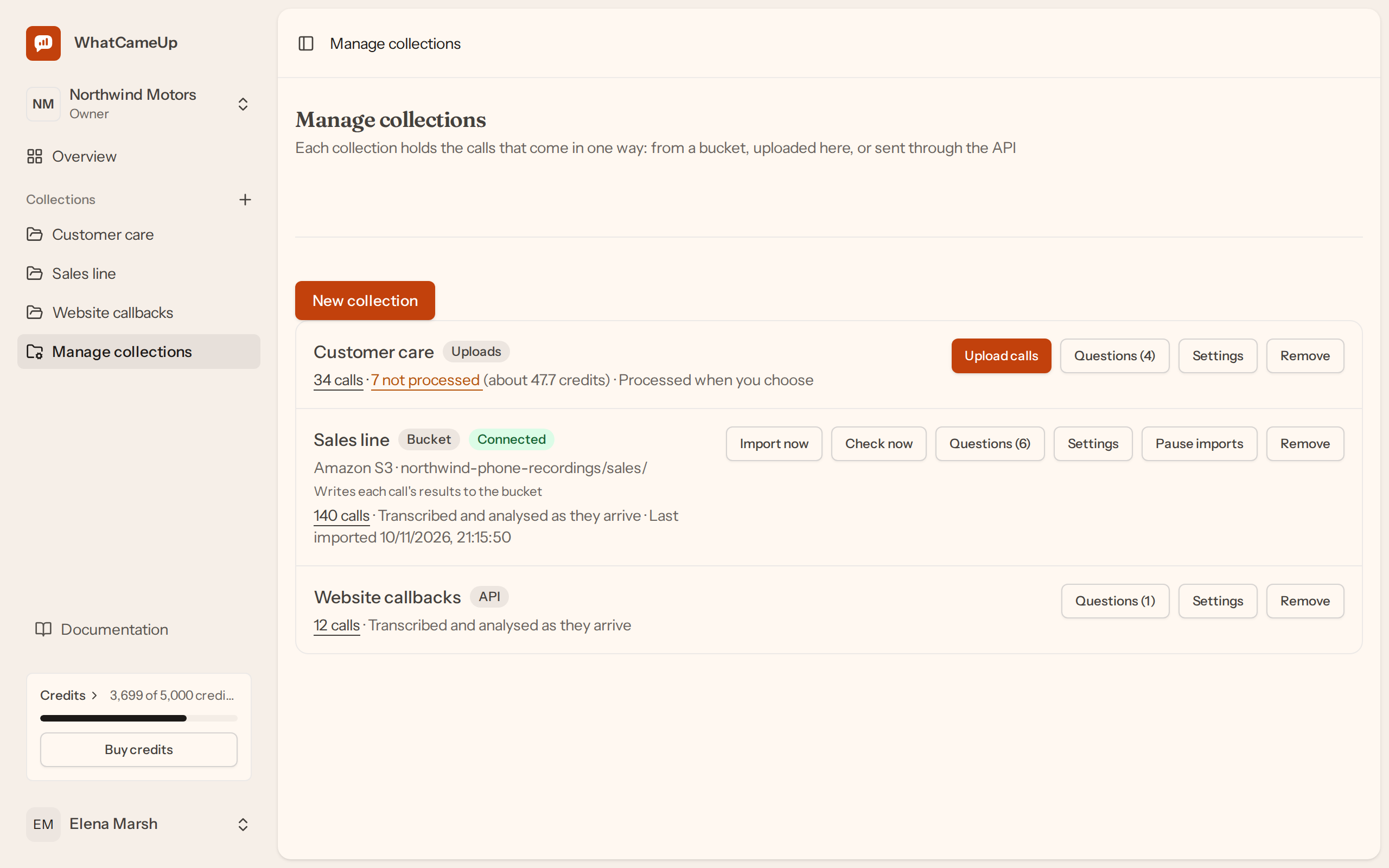
Ways in
Each collection takes its calls in exactly one way, chosen when you create it:
- Bucket: WhatCameUp imports the recordings your phone system saves to cloud storage, checking for new ones every 15 minutes. See Connecting a bucket.
- Uploads: you upload recordings in the browser. See Uploading calls.
- API: your own systems send recordings with an API token that belongs to the collection. A phone system or AI voice agent that already transcribes its calls can send their transcripts instead, to the same collection. See The API.
A call belongs to one collection. To have the same call in another collection too, bring it in there as well.
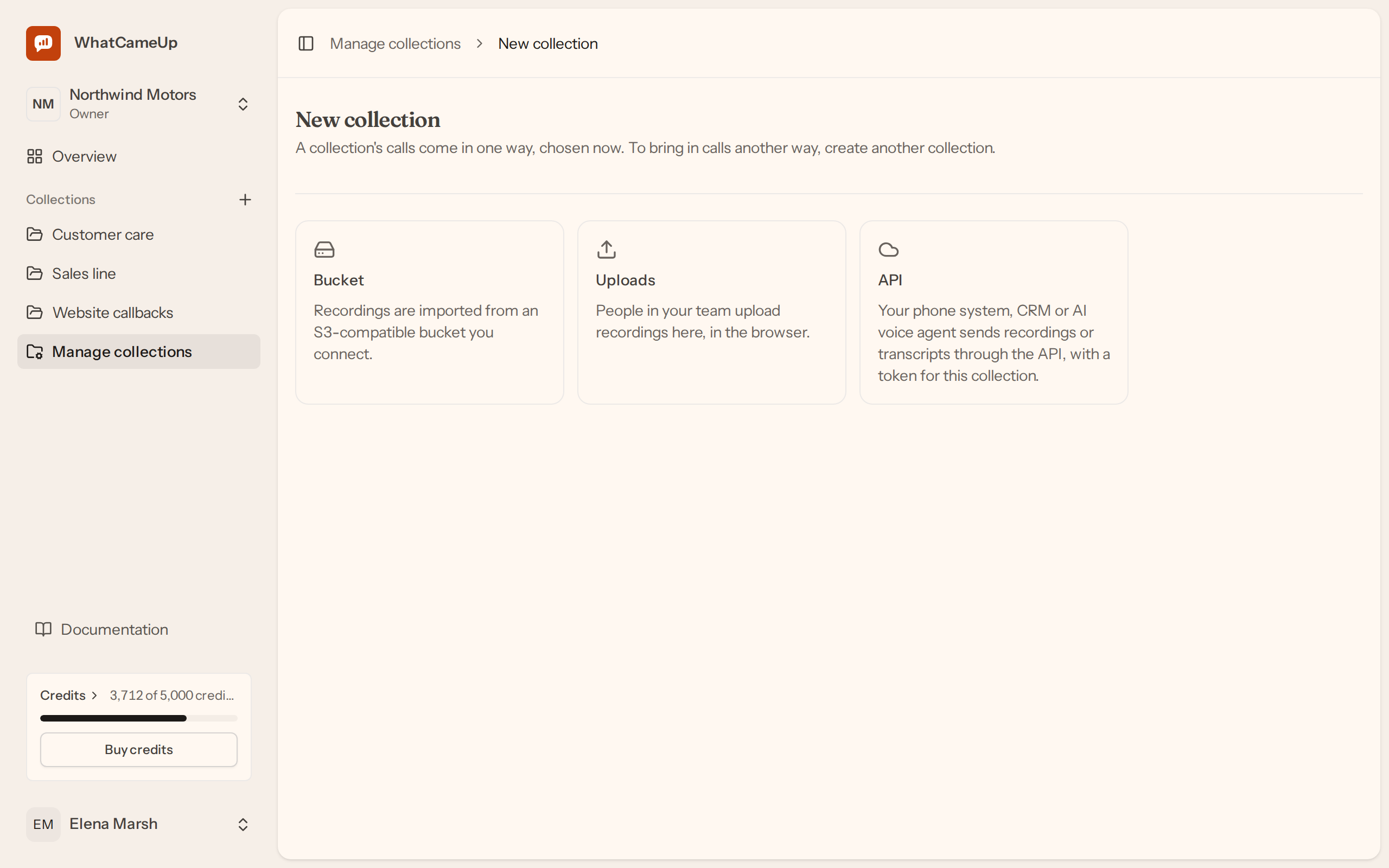
Kind of calls
When you create a collection, you also say what kind of calls it takes. That only picks the questions it starts with, written in your team's report language, which you can change or remove like any other under Questions:
- Support: how the call ended (resolved, follow-up needed or unresolved), and how frustrated the customer got.
- Sales: how the call ended (sale, next step agreed or no sale).
- Other: no questions. Write your own, or have the assistant draft them. See Questions.
Settings
Team owners and admins open Settings for the collection to change how its calls are read. The settings come in parts, listed beside them, and each part is saved on its own: General, Bringing calls in (for a bucket or an API collection), Metadata, Transcription, Analysis and Reports.
If someone changed a part after you opened it, in another tab or from another computer, saving it is refused rather than putting the earlier settings back: reload it to see the changes. A change to one part doesn't stop you saving another, with one exception: while a bucket collection's calls come with no metadata, Bringing calls in shows the time zone set under Metadata, so a change to that time zone, or to whether the calls come with metadata, counts for both. Leaving a part with changes you haven't saved asks first.
General
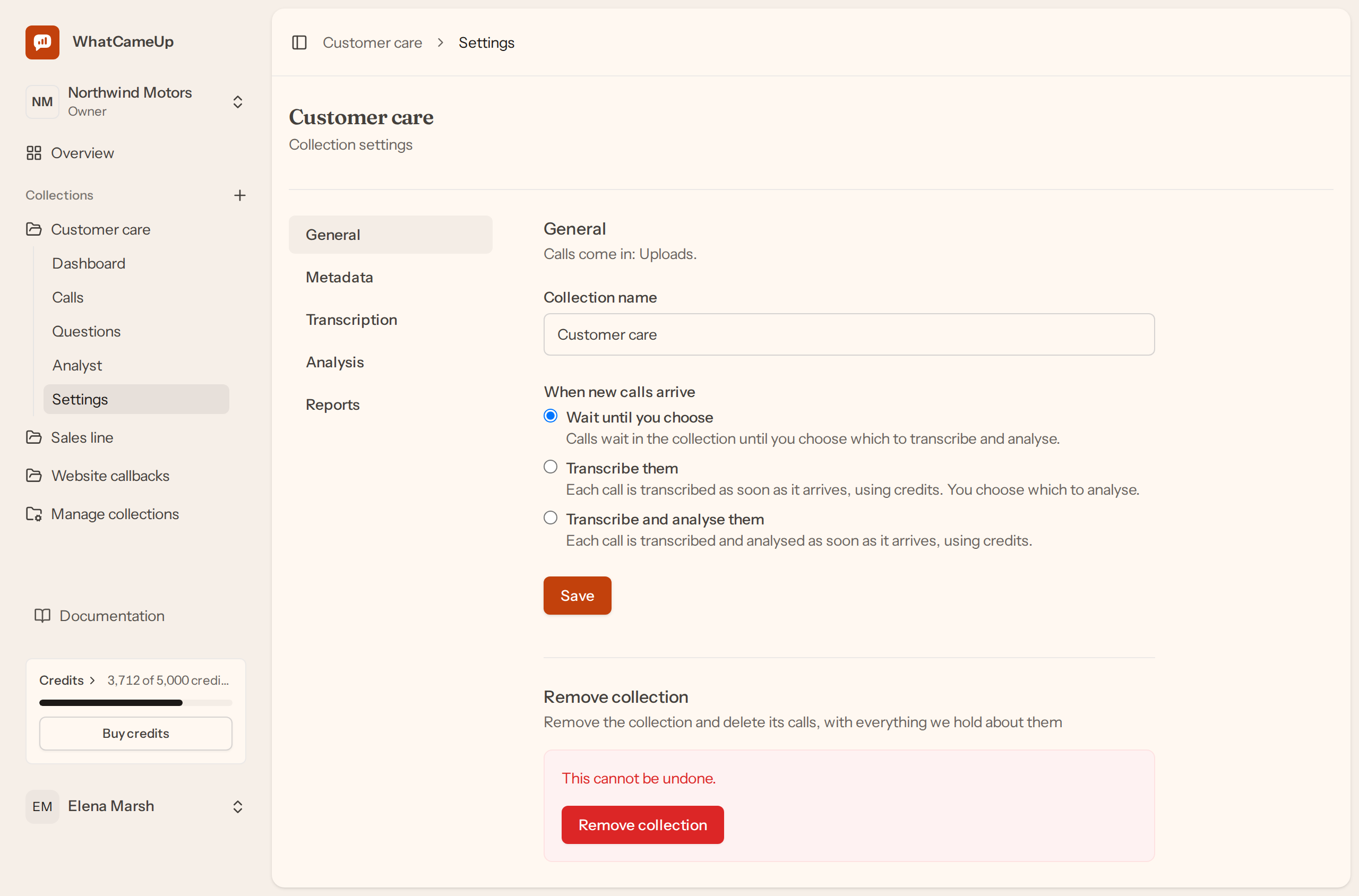
- Collection name.
- When new calls arrive: wait until you choose which to process, transcribe them as soon as they arrive, or transcribe and analyse them as soon as they arrive, using credits. See Processing calls.
The collection is removed from the bottom of this part; see Removing a collection below.
Bringing calls in
- A bucket's folder, the calls it imports, by their dates, and whether results are written back to the bucket, with how its last check went. Changing the folder or where results go checks the bucket again. See Connecting a bucket.
- An API collection's API tokens, which your systems use to send it recordings or transcripts. See The API.
An uploads collection has nothing to set here: its calls are uploaded on its Calls page. See Uploading calls.
Metadata
- File name pattern: if your file names hold details of the call, describe them and they become metadata on each call. For example,
{agent}-{call_direction}-{unique_call_id}-{date:YYYYMMDD}-{time:HHmmss}readssophie-inbound-48210-20261009-101432.wavas agentsophie, directioninbound, call ID48210, and the call's date and time. Changing it reads the file names of the calls already in the collection again. - Time zone of dates in file names: the zone the dates and times in your file names are in.
- Take metadata sent through the API: when on, metadata your systems send through the API, for a call or a call ID, is added to the collection's calls. When the file name and the API give the same field, the API's wins.
- A bucket's choice of files by their names, and its metadata files. See Connecting a bucket.
- API tokens, for an uploads or bucket collection: the tokens your systems use to send its calls' metadata, read its calls, and have them processed. See The API.
Transcription
- Language spoken in the calls: choose it when you know it, or let it be detected for each call.
- Audio channels: most phone systems record the agent and the customer on separate channels (stereo), which tells their voices apart reliably. Mono recordings have both on one channel, and the voices are told apart by how they sound.
- Agent's channel in stereo recordings: the channel the agent speaks on. The phone system's welcome message is usually on it too. If a transcript shows the agent's words under Customer, choose the other channel; you can swap the speakers of calls already transcribed from the same place.
- Skip calls shorter than: calls shorter than this many seconds, such as missed or abandoned calls, are marked Too short as they arrive, and are not transcribed and cost nothing. Calls under a second are always skipped. Changing it sorts the calls not transcribed yet again: those now shorter are marked too short, and those marked too short that are now long enough wait to be processed, or are processed at once if the collection processes calls as they arrive.
Calls sent through the API as transcripts use none of these.
Analysis
What the AI is told about the collection's calls, and the language it reports in. Changes apply to calls analysed from then on.
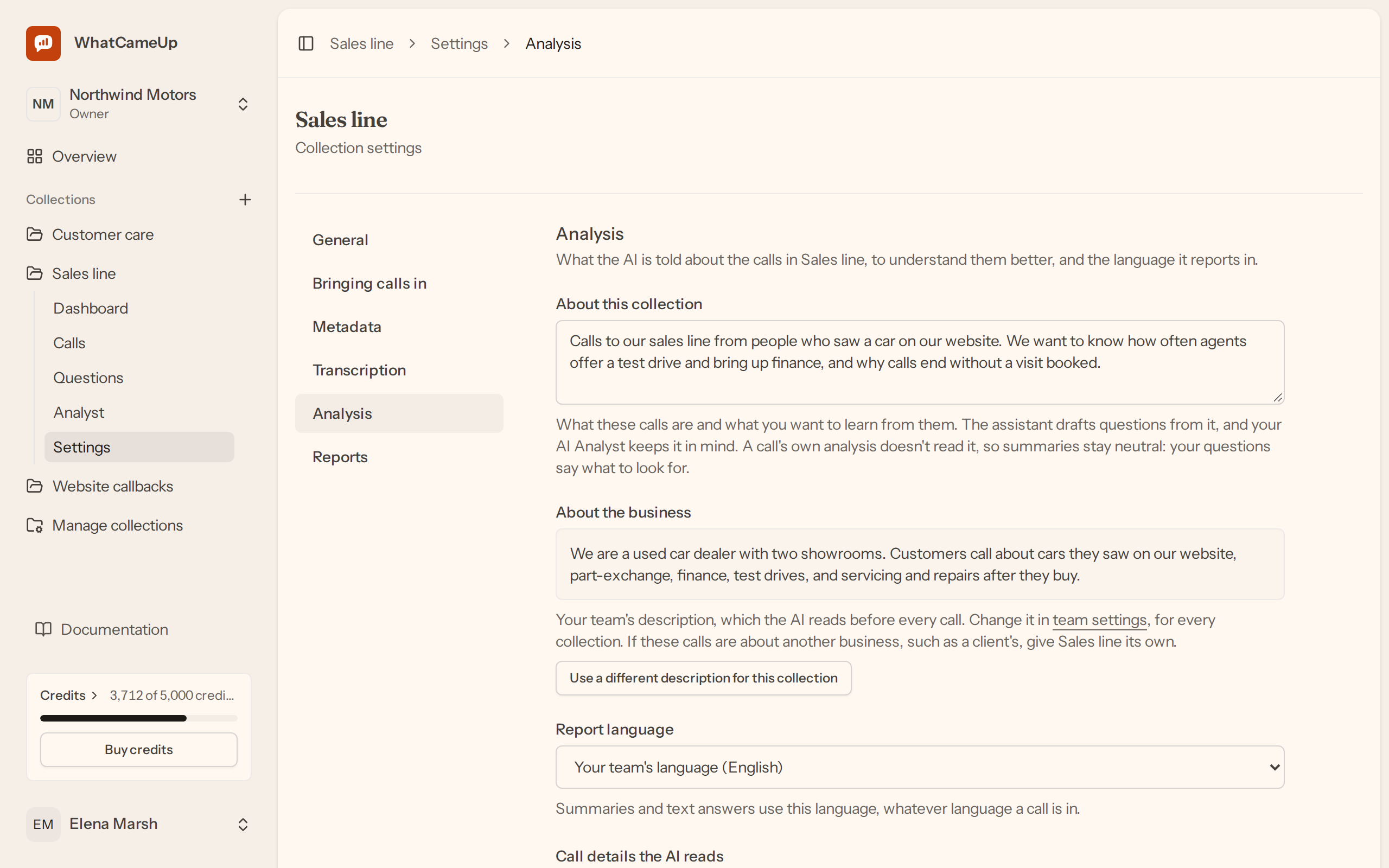
About this collection says what the collection's calls are and what you want to learn from them, such as "Calls to our sales line from people who saw a car on our website. We want to know why calls end without a visit booked." The assistant drafts questions from it, and your AI Analyst keeps it in mind in its briefings and answers. A call's own analysis doesn't read it, so its summary stays neutral: your questions say what to look for in each call.
About the business is a few sentences on what the business does and why customers call, which the AI reads before every call to understand it better. Every collection uses your team's description, from Settings → Team, and shows it here. If a collection's calls are about another business, such as a client's, choose Use a different description for this collection and write its own; Use your team's description goes back to the team's.
The report language is the language summaries and text answers are written in, whatever language the calls are in. It is the team's, unless a collection chooses another.
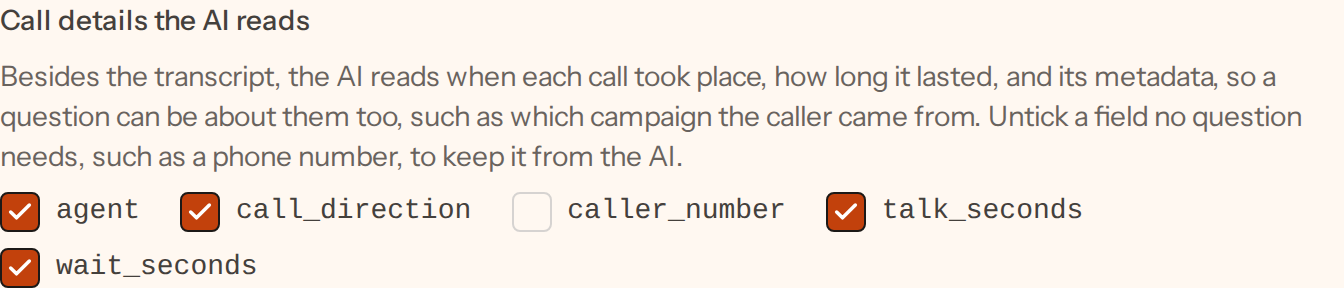
Under Call details the AI reads, every metadata field of the collection's calls is listed, ticked unless you untick it; a field new to the collection shows up a few minutes after its first call. Untick a field no question needs, such as a caller's phone number, and the AI no longer sees it in calls analysed from then on. When a call took place and how long it lasted are always read. The assistant drafting questions also knows which fields the calls have, and can suggest questions about them. See Questions.
Under Earlier calls with the same customer, choose the field that tells who the customer is, such as the caller's number. The AI then reads the customer's calls of the 90 days before each call with it: how many there were, and the reason, summary and sentiment of the latest five. It can tell when a customer calls again about the same matter, and a question can ask about it, such as "Is the customer calling again about something they called about before?". When many calls are processed at once, the oldest go first, and a call waits a few minutes for its customer's earlier calls still being processed, so it can read what they were about. Numbers match however they are written, with or without the country code; choose the country of numbers written without one. If the number is in one field on incoming calls and another on outgoing ones, add the second: the first holding a valid number counts, so an agent's extension is passed over. Choose Customer IDs from your own systems when the field holds an ID instead; one such as "0" or "unknown" names no one. A number or ID on more than 100 calls in those 90 days is taken to be shared, such as your own number on outgoing calls, and no earlier calls are read for it. The field can stay unticked under Call details the AI reads, as the numbers are matched here and the AI never sees them. Each call's page lists the customer's earlier calls as an analysis of it reads them now, with a link to every call with that customer, and the dashboard counts how many customers called again within 7 days (see Dashboards). A call whose content was removed under your retention period no longer says who its customer was, so it isn't counted.
Calls analysed before the customer's earlier calls were known keep their analysis, made without them: those analysed before you chose the field, those whose number arrived later, and those analysed before an earlier call came in or was analysed. They aren't analysed again on their own, as that costs credits. The Analysis settings say how many there are, and See them in Calls lists them, with Analyse these again to analyse them all at 0.2 credit per minute, as any analysis. Narrow the list by date first to analyse only recent calls. Each keeps its analysis until the new one is ready.
Reports
What the team is sent about the collection's calls, and when.
- Weekly email: the day and time the collection emails the team its report on the week just ended, or off. See Dashboards, reports and exports.
- AI Analyst: once one is hired, whether it writes a briefing each week, sent with the weekly email, and each month on the month before. See AI Analyst.
Removing a collection
Team owners and admins can remove a collection from the bottom of its general settings, or from Manage collections. Its calls are deleted with it, with everything WhatCameUp holds about them, and its questions, analyst, reports and API tokens go too. To remove a collection that has calls, you type its name to confirm. This cannot be undone, and credits already used are not given back.
The collection disappears at once and takes no more calls, and calls waiting to be processed are not processed. Its calls are deleted in the background, which can take a few minutes for a large collection; a call being transcribed or analysed is deleted once that finishes. Its name can be used again once it is gone.
Recordings in your own bucket stay there. If you connect the bucket again, they are imported again as new calls.